Category Archives: Apple iOS

Posts about the iPhone and (most times) also about the iPod Touch (the “iTouch”) and the iPad (which I don’t have YET!).

ReelDirector is video editing for the iPhone !!!

I shot, edited (titles and transitions) and uploaded this video from my iPhone. I used ReelDirector for the editing. This is my first attempt but it was way easy to use. reeldirectorvideoThe video was shot on the iPhone, edited on the iPhone and e-mailed to YouTube for uploading. It’s five short stiched-together videos (which I was able to trim when I imported them) with some text at the beginning and end. I used the same transition (blur) for all the transitions since it was easy to use (you can customize this per transition). You can rearrange the videos once they are in there, but I pretty much picked them in the order that I wanted them in.

This is from the balloon festival from a few months ago. The first speaker is me talking as I shot it. The rest is whatever voiceover was going on at the time. Nothing fancy at all.


Direct link to the video is here.

I didn’t time it, but I’d guess it was about three or four minutes (on the iPhone 3gs 3.01 OS) to stitch and build the one minute video. My biggest complaint is I couldn’t extend the time for the titles and credits and the time is too short). I also wish I could have inserted some photos too (but then there wouldn’t have been audio behind it). The strangest thing was that it didn’t save the video back to the phone, I didn’t see any way to get it out of the program other than e-mailing it to myself (or YouTube) but that worked fine (the iTunes page says this works in 3.1). it’s very cool software but it’s a little pricy at $7.99 for $3.99 (since iMovie came out); I used an iTunes gift card that I got last month for my birthday which made the (old $7.99 price) a bit more digestible…

Testing out your MMS on your phone

Playing around with the new MMS on your iPhone? You can use text4free.net to send yourself a MMS text to test it out. Actually, it’s not just for texting to yourself, it will let you send texts around the world for free!

textforfree.net.jpgIt’ll send a picture or audio file. I sent a few, some went quick, some took a few minutes. It says it’ll send video too, but I haven’t tried video yet.

There is a maximum file size of 1 MB and allowed file types are .jpg, .png, .jpeg, .wbmp, .mid, .midi, .mp3, .mp4, .wav, .wma, .3gp, .mp4

This will work with phones other than an iPhone, I just brought up the IPhone since MMS got turned on for all the US AT&T users today.

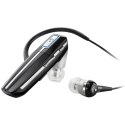
Plantronics Voyager 855 A2DP Bluetooth Review (on my iPhone)

What I don’t like about my Bluetooth earpiece for my iPhone is that it only streams audio from the phone calls. Why Apple (all cell makers) don’t let you use BT audio from other parts of your phone, I don’t understand. I have a pair of semi-bulky BlueTooth stereo headphones that and they stream the iPod music, podcasts, sound effects from games, and everything (but they’re bulky). My normal bluetooth earpiece just fits in my shirt pocket for when I’m not using it so I rather use that. The trick is to find an earpiece that supports A2DP.

Plantronics Voyager 855 Bluetooth Headset (Black) PlantronicsI decided on the Plantronics Voyager 855 Bluetooth Headset for three reasons: they were inexpensive, I’ve had good experience with Plantronics in the past and they came with a second earbud (earplug?) for your other ear if you want stereo sound.

So now I can listen to podcasts or news (or whatever) while waiting for something (doctor appointment, a movie to start, anything) without having to cover both ears (and not have to carry anything big around to do it). The same goes for videos or watching YouTube. Or if I’m playing a game I’ll still get sound, it’s nice to have audio feedback even for simple puzzle games, but especially for puzzle games. Your device must support A2DP for audio other than phone calls.

I think my main uses for this will be phone calls, listening to audio (books, The Economist and podcasts, streaming some radio) and some games. I can walk pretty far from the phone when listening, when I head upstairs (most amount of wall/stairs interference) it cuts out a little, but once I’m upstairs it still sounds great.

I think I’ll rarely plug in the second earpiece but I’ll keep it in my computer bag just in case. It’d be great if I knew I was going to be somewhere loud, but it might be too loud for them to hear me. Obviously I can use these for music, but I rarely listen to music via headphones, I generally listen to music at home or in the car, but I guess I now have the option (sort of).

The packaging was very nice, I couldn’t believe these were a $35 from from the box. In the box was a nice manual, not some teeny tiny thing that you’ll never find again. The BT headset, a nice carrying bag, two ear loops, 3 different pairs of ear gels (plus a weird pair foam ear pieces), a wall plug charger and some weird strap (unidentified in the manual) to dangle it from your neck (like a neckless, I guess).

So this BT headset gets a two thumbs up from me. No real minuses on the headset at all, but this is my first few hours of use and I really enjoy them so far.

I’ll probably do a follow-up in a few days, so if you have any questions, leave them in the comments.

Can my iPhone replace my laptop?

Replace my laptop? Not a chance! But the more I use it…

Previously I took my laptop everywhere. The iPhone has easily cut out 20%-25% of my dragging around a laptop; my rule is generally don’t leave home without it.

With my iPhone, I’m still connected to the world. I can read, I can forward and I can bookmark things and type (if I have to), it’s more than the basics. Of course I can watch and listen to all the “stuff” that’s on the iPod portion of the iPhone too. If I could get a bluetooth keyboard (or even a wired keyboard the plugs into the dock) I think I could drop carrying the computer around to 50% of what I used to do. I don’t really want to JailBreak my phone to do this. (FYI, this feature is now is iOS 4 for several iPhone models)

apple-bt-iphone-keyboard.jpg
This keyboad looks huge, but it’s really the tiny wireless one from Apple.

I don’t even need the keyboard to work in all the applications (although I’d like it), I can just type in a special keyboard application then copy and paste into the program where I need the information.

I’d need an external battery pack for the iPhone though. I thought I’d already need to, but I generally leave it in the charger at home and I charge it in the car. It’s pretty rare that I notice that I’m running really low.

It’s been a while now that I’ve had the iPhone, but it’s still a new toy so I use it a lot but it’s pretty rare when I “need” to bring laptop along. The laptop is mostly just for typing these days.

Photo from Geeky-Gadgets and the linked page has a video of this working on the JailBroken iPhone…

The internet is an amazing place

image650862516.jpgI can be anywhere in the country and watch the space shuttle land live on my phone. It amazes me every day.
I can’t imagine what the next few years will bring :)

PS – I’m writing and posting this from my phone after capturing the image while watching it live!!!

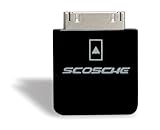
Scosche Charging Adapter for iPhones and iPods (later generations)

So if you have any older iPod or iPhone accessories or chargers many of they don’t charge properly. I’m not sure what they changed but it’s a pain when it’s a nice speaker dock or your car stereo won’t charge our battery (and instead drains the battery).

Enter the Scosche Charging Adapter for iPhone 3G, iPhone 3GS, iPod touch 2G and iPod nano 4G! This device plugs in between the cable and you iPod of iPhone. I plug my iPhone into the adaptor and then into the cable in the car and now I can listen and charge my iPhone. So I can actually stream audio over the air (network) and pipe it straight into my stereo in my car, it’s awesome!

I’ve picked up the adaptor for $24.99 at Amazon. They also make an adaptor that plugs into some docks/stands that does the same type of thing (available in black or white).

It was well worth it for me, I think my car stereo is less than 18 months old so I didn’t need a new one and they’d probably have charged me at least $50 labor just to run a new cable (assuming Alpine even makes one for my stereo, which I couldn’t find). So this was a no-brainer.

If it’s a short ride and I’m just listening to the iPhone via the iPod application then I don’t use the adaptor so that I’m not just charging for only few minutes. I try not to charge my phone (or any device) if I’m really not going to need it, the iPhone is probably only good for a certain amount of charges so I try not to waste the number of charges.

FYI – In my experience plugging the Scosche adaptor into the iPhone first before the other device works better; otherwise (at least my car stereo) sees it as 1/2 an iPhone and gets confused.

iTunes Application Managment – We really need it…

So the rumors this week are that in iTunes 9 that Apple is going to add Application Management. My iPhone would be a lot more useful for me if it had that, I’m always installing and trying apps and it messes with the order of everything. Here’s a concept that someone ut together a few months ago.


View iTunes App Management on Youtube

It’s very Apple-ish but some of it’s pretty complicated for what Apple likes to do.

The above is pretty close to what I’m looking for. But I’d take something way more primitive…

Seidio Innocase II Holster Combo for iPhone – Review

So I made a plea a few weeks ago looking for a case for my iPhone (zero responses). Just couldn’t find the one for me, I want something not too bulky but I wanted the screen to be protected. I was worried about damaging the screen, I’m not so concerned about scratches to the case (or even around the edge of the screen). Although when you try to take things in for warranty repair, I’ve learned the less damage to the case the better.

Seidio Innocase II Surface Spring Clip Holster Combo for iPhone 3GS, 3G (Black) SeidioSeidio Innocase Holster for iPhone 3G and 3GS - Black SeidioI think this is the case for me, it’s the Seidio Innocase II Surface Spring Clip Holster Combo for iPhone 3GS and 3G. When they say combo it’s really two products in one it’s this holster with a separate form fitting case for the iPhone that fits in the holster. What I really really like about this is that the screen faces in. I loved my cheaper holster but the screen faced out and that made me nervous.

The form fitting case is nice because it’s not too big and it makes the darn iPhone a lot less slippery! It’s easy in and out of the holster. And the holster has a stopper on it so that the phone cannot slide and release the pressure of the spring clip, it pretty much has to be intentionally released to remove it. I love it and since I’ve been using this I’ve stopped looking at other cases for my iPhone.

The case fits so tightly if you’ve got a screen protector on your iPhone make sure it’s on perfect or it’ll hit the case, I had to peel it back (it wasn’t perfect) and trim it back (now it looks bad). And I think it definitely runs a little hotter with the case on.

Here’s the problem: Since I’ve got the case now it doesn’t fit in my car holder and it’s a little tight on my bicycle holder (a future post). And it fits so tightly it takes way too much time to remove.

So if you think this is the type of case you want, it’s definitely worth the extra money and it seems very well built. Just make sure you pick the “combo” so you get the holster and the case; the phone doesn’t fit in the holster without the case.
